> ## Documentation Index
> Fetch the complete documentation index at: https://docs.wyzehost.com.br/llms.txt
> Use this file to discover all available pages before exploring further.
# Como trocar a porta RDP da sua VPS
> Neste guia, mostraremos como alterar a porta rdp da sua vps windows.
## Guia em vídeo:
## Passo a passo (Versão escrita)
1. No menu Iniciar, digite **regedit** na barra de pesquisa.
2. Navague até a chave: `HKEY_LOCAL_MACHINE\System\CurrentControlSet\Control\Terminal Server\WinStations\RDP-Tcp`
## Editando a porta RDP
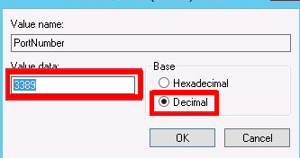
1. Localize por **portnumber**.
2. Selecione a opção **decimal**.
3. Digite o número da nova **porta rdp** que você deseja usar e **reinicie** o vps.
Se você tiver qualquer dúvida, entre em contato com a nossa equipe de suporte
em nosso [WhatsApp](https://wa.me/5511912842643)
e [Discord](https://discord.com/invite/x3qFazUTZ7).
 2. Navague até a chave: `HKEY_LOCAL_MACHINE\System\CurrentControlSet\Control\Terminal Server\WinStations\RDP-Tcp`
## Editando a porta RDP
1. Localize por **portnumber**.
2. Selecione a opção **decimal**.
3. Digite o número da nova **porta rdp** que você deseja usar e **reinicie** o vps.
2. Navague até a chave: `HKEY_LOCAL_MACHINE\System\CurrentControlSet\Control\Terminal Server\WinStations\RDP-Tcp`
## Editando a porta RDP
1. Localize por **portnumber**.
2. Selecione a opção **decimal**.
3. Digite o número da nova **porta rdp** que você deseja usar e **reinicie** o vps.